
Free Diazo theme for Plone


Project description
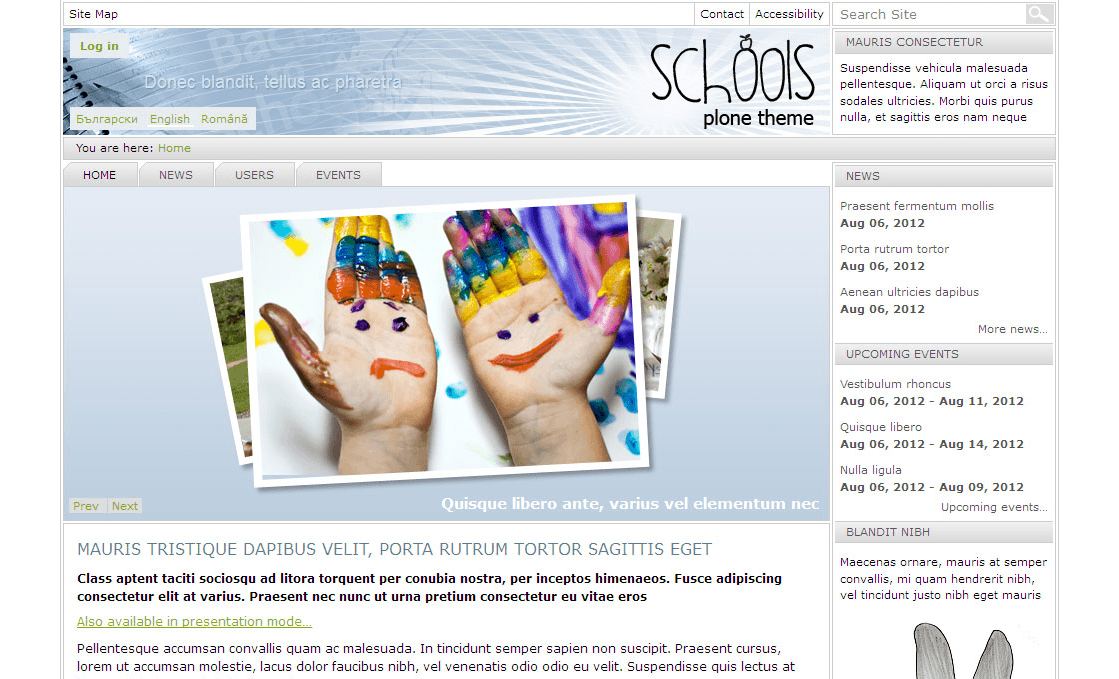
Schools is a free fully responsive diazo theme for Plone.
Screenshot
Features
Responsive Web Design
Schools is a fully responsive theme that allows for easy viewing on mobile devices and tablets. The website will start to automatically resize and reposition the content to accommodate the different device screen sizes.
Customizable logo
Schools diazo theme comes with default Plone logo. You can replace it with your own as you would do it in default Plone: in ZMI customize portal_skins -> sunburst_images -> logo.png.
Configurable left/right column width
Go to Site Setup -> Theming, open Advanced settings tab. In Parameter expressions textarea change the columnonewidth or/and columntwowidth parameters values respectively.
Improved thumbnail display view
To see the changes go to Display drop-down menu and click on Thumbnail view.
Top image
The theme allows you to replace header image for the whole site or site sections. To have new top image, add image with topimage shortname into desirable location on site. Default image size is 993*107px.
In case you upload higher image, it will not be completely displayed. To change it go to Site Setup -> Theming, open Advanced settings tab. In Parameter expressions textarea set the logo_min_height parameter value from 107 with a new header height.
Top portlet
Right top area is reserved for a portlet. The first portlet from right column is displayed there.
Theme Colors
You can change links colors: links_color, hover_links_color, and visited_links_color. For this, go to Site Setup -> Theming -> Advanced settings tab. In Parameter expressions textarea change the ‘links_color’ or/and ‘hover_links_color’ or/and ‘visited_links_color’ parameters values respectively.
Carousel Banner
Rotating banners can be added in case you install Products.Carousel add-on. Custom Carousel display style applies automatically to carousel banner.
To create a banner on the front page, go to the Carousel tab in the task bar. Set carousel options and select Carousel Banner from Add new… drop-down menu. Upload image that will be used as one rotating banner, type its title and text (will be displayed under the image), and provide web address, image title will be linked to. Add as many carousel banners as you need.
Recommended image dimensions are 397*288px. There are 4 demo images that might be used as demo banners - see src folder within theme package (quintagroup -> theme -> schools).
Editable Slogan
Schools Theme uses customizable slogan. To change it, go to Site Setup -> Theming -> Advanced Settings tab. In Parameter expressions textarea change Free Theme for Plone slogan in slogan line.
If you need your slogan to be displayed in non-ASCII characters, go to Site Setup -> Theming, open Advanced settings tab. In Parameter expressions change the following field
slogan = string:Free Theme for Plone
to
slogan = python:path('context/slogan|string:').decode('utf-8', 'ignore')
and in Site Setup -> Zope Management Interface settings -> Properties tab add a new property slogan, type string, value your slogan and save.
Editable footer
Customize: portal_view_customizations -> plone.footer.
Supported Add-Ons
Additional features can be activated:
- Products.Carousel
Adds rotating Carousel banner feature. Adjusted stylings to Carousel
- Products.ContentWellPortlets
Allows adding portlets in the header, footer and content area.
- Products.PloneFormGen
Adds TTW Form Generator feature.
- quintagroup.dropdownmenu
Adds adjusted styling to drop-down menu.
- Products.LinguaPlone
Adds multilingual functionality with adjusted styling for language selectors.
- quintagroup.slidertemplates
Enhanced Responsive Views for NG Collection Portlet (Carousel, Shelf, Tabs)
- quintagroup.megamenu
Clean and professional fully responsive Mega Menu solution for Plone. This product allows Plone website to display panel added to portal top as drop-down menu for navigation tabs.
Dependencies
plone.app.theming
Recommended
Theme was tested with:
Plone 4.3rc1
plone.app.theming 1.1b2
Products.Carousel 2.2.1
Products.ContentWellPortlets 4.2.1
Products.PloneFormGen 1.7.6
quintagroup.dropdownmenu 1.2.11
Products.LinguaPlone 4.1.3
quintagroup.megamenu 1.2
quintagroup.megamenu 1.3
quintagroup.slidertemplates 1.0
Home Directory
Installation
quintagroup.theme.schools can be installed in any of the following ways.
Installation via buildout
In the buildout.cfg file of your instance:
Add quintagroup.theme.schools to the list of eggs to install, e.g.:
[buildout]
...
eggs =
    ...
    quintagroup.theme.schools
Re-run buildout:
$ ./bin/buildout
Restart the Zope server:
$ ./bin/instance restart
Then activate ‘Schools Theme’ in Plone (Site Setup -> Add-ons).
Installation: development mode
If you want to customize Schools theme please use the following installation instructions:
download quintagroup.theme.schools-version.zip archive from http://pypi.python.org/pypi/quintagroup.theme.schools
extract theme archive to get quintagroup.theme.schools-version folder. Remove version from folder name to have quintagroup.theme.schools folder
put quintagroup.theme.schools folder into src directory of your buildout
in buildout.cfg file of your buildout add quintagroup.theme.schools to the list of eggs you are developing and to the list of eggs to install:
[buildout]
...
develop = src/quintagroup.theme.schools
...
eggs =
    ...
    quintagroup.theme.schools
Re-run buildout:
$ ./bin/buildout
Start instance in development mode:
$ ./bin/instance fg
Install Schools Theme in Plone (Site Setup -> Add-ons).
Now you can customize Schools Theme by modifying quintagroup.theme.schools package in src directory of your buildout.
ChangeLog
6.8 August 21, 2015
Fixed diazo rules for favicons [roman.ischiv]
6.7 June 05, 2015
Fixed styled for navigation on mobile screen [roman.ischiv]
6.6 June 02, 2015
updated styles for new versions[1.3.1] of quintagroup.dropdownmenu product [roman.ischiv]
6.5 December 29, 2014
Fixed rules ffor panels in portal-top [roman.ischiv]
6.4 December 12, 2014
Added style for slidertemplates and megamenu products [roman.ischiv]
6.2 March 18, 2013
Plone 4.3rc1 compatibility added [naivok]
6.1.2 March 12, 2013
Fixed accesskey [naivok]
Plone4.3 compatibility added [naivok]
6.1.1 January 03, 2013
Fixed footer link [naivok]
Fixed search-results-bar link color [naivok]
6.1 November 28, 2012
Added preview image to diazo panel [naivok]
Added ajax_load [naivok]
6.0.10 September 21, 2012
Fixed style to history [naivok]
Fixed style to carousel [naivok]
Fixed style to eventDetails [naivok]
6.0.9 August 20, 2012
Updated .required styles [naivok]
quintagroup.dropdownmenu 1.2.11 compatibility added [naivok]
6.0.8 - July 17, 2012
fixed style to portal-personaltools for Responsive Web Design [naivok]
removed unnecessary id attribute for the body [naivok]
updated Doctype for Plone 4.2 [naivok]
6.0.7 - May 16, 2012
fixed change slogan [naivok]
changed the order of inserting ploneCustom.css [naivok]
updated the way the footer is inserted [naivok]
added schools class to body [naivok]
added style to Responsive Web Design [naivok]
6.0.6 - January 20, 2012
bug fixed [naivok]
6.0.5 - January 17, 2012
Products.PloneFormGen compatibility added [naivok]
Products.Carousel dependency removed [naivok]
6.0.4 - December 30, 2011
plone.app.themingplugins dependency removed [naivok]
6.0.3 - December 19, 2011
possibility to edit slogan added
possibility to replace header image added
logo replacement fixed
6.0.2 - December 2, 2011
base styles updated
styles for ContentWellPortlets adapted
improved css for correct work with Poducts.Carousel
added possibility to make basic edits via diazo panel: column width, links color (link, hover, visited), logo height and top portlet block height.
6.0.1 - November 28, 2011
styles for searchbox with dropdown menu fixed
6.0 - November 23, 2011
theme package converted into diazo theme
4.2 - Apr 11, 2011
work with quintagroup.dropdownmenu fixed
Styles for sitemap, document editable and live search fixed
columnOneWidthInt value added to base_properties
Products.LinguaPlone compatibility fixed
4.1 - Jan 24, 2011
theme updated to Plone 4
4.0 - Mar 01, 2010
theme product is package now [serg]
top portlet manager was added [serg]
Products.Carousel product integration [serg]
most of css images were merged into image sprite [serg]
new properties were added to base_propeties [serg]
favicon was added [serg]
3.3.2 - Dec 2, 2009
Improved print.css [serg]
3.3.1 - Oct 16, 2009
Default theme logo changes [serg]
3.3 - Sep 4, 2009
Restored breadcrumbs [serg]
3.2 - June 15, 2009
Ie fixes were separated
Customized templates were updated to Plone 3.2
3.1 - June 25, 2008
Language selector panel styled
Plone 3.1.2 compatibility tested
3.0.4 - Mar 18, 2008
Updated installation/uninstallation
3.0.3 - Mar 12, 2008
Added styles, changed txt files
3.0.2 - Mar 12, 2008
Fix problem with unreferencable object in imported content
3.0.1 - Feb 13, 2008
Fixed problems with editing imported content.
3.0 - Oct 31, 2007
Release for Plone 3.0.x
1.0.1 - June 18, 2007
Release for Pone 2.5.2






